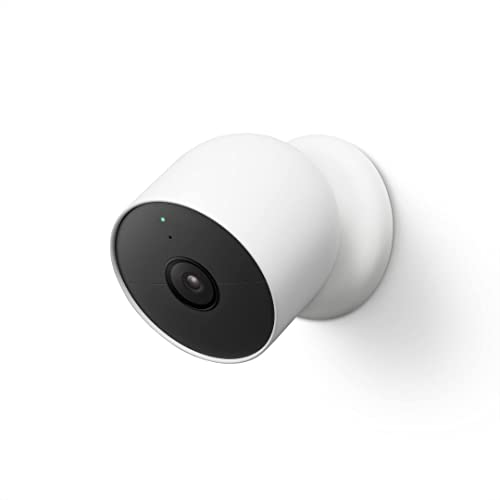
Google Nest Cam Outdoor or Indoor, Battery – Features & Prices in Saudi Arabia :
Google Nest Cam Outdoor or Indoor, Battery – 2nd Generation – 1 Pack
Product Dimensions
3.27 x 3.27 x 3.27 inches
Item Weight
14 ounces
ASIN
B09FCMSJZG
Item model number
GA01317
Batteries
2 Lithium Ion batteries required. (included)
Date First Available
April 19, 2022
Manufacturer
Google
Country of Origin
Vietnam
Test video – Google Nest Cam Outdoor or Indoor, Battery :
Product highlights :
Nest Cam has built-in intelligence and can tell the difference between a person, animal, and vehicle and send alerts directly through the Google Home app[1], no subscription required.Controller Type:Google Assistant.Connectivity protocol:Bluetooth;Wi-Fi.Power source type:Battery Powered
Easily check in from anywhere 24/7 with 1080p HDR video[1] with night vision, and see what you missed with 3 hours of free event video history[2]; add a Nest Aware subscription (sold separately) for up to 60 days of video history[3]
If your Wi-Fi goes down or there’s a power outage, Nest Cam will store up to an hour of recorded events so you can see what you missed[4]
Put Nest Cam anywhere, outside or in; it’s battery powered, so you don’t need to set it up near an outlet, and the magnetic mount makes installation effortless
For continuous power and 24/7 video recording with Nest Aware Plus, add a weatherproof power cable or indoor stand with power cable (both sold separately)
Stream your live video feed hands-free on compatible smart displays with Google Assistant, and compatible smart displays, smart TVs, and tablets with Amazon Alexa
Questions & Answers – Google Nest Cam Outdoor or Indoor, Battery :
➕ What is the price of Google Nest Cam Outdoor or Indoor, Battery in Saudi Arabia ?
The price of Google Nest Cam Outdoor or Indoor, Battery in-store is 520 SAR VAT.
➕ When Google Nest Cam Outdoor or Indoor, Battery was released ?
The release date was April 19, 2022.
➕ What is the price of Google Nest Cam Outdoor or Indoor, Battery cheap used ?
The price of Google Nest Cam Outdoor or Indoor, Battery used is 360 SAR VAT.
➕ What are the main characteristics of Google Nest Cam Outdoor or Indoor, Battery ?
Special specifications :
Nest Cam has built-in intelligence and can tell the difference between a person, animal, and vehicle and send alerts directly through the Google Home app[1], no subscription required.Controller Type:Google Assistant.Connectivity protocol:Bluetooth;Wi-Fi.Power source type:Battery Powered
➕ Is it interesting to buy this product ?
The best people who can answer you are customers who have already bought and tested this product (See Customer Reviews). This product is rated 4.4 / 5 on Amazon.
➕ Where to buy Google Nest Cam Outdoor or Indoor, Battery in Saudi Arabia ?
Technical specifications – Google Nest Cam Outdoor or Indoor, Battery :
Recommended Uses For Product
Indoor Security, Outdoor Security
Brand
Google
Model Name
Google Nest Cam Battery
Connectivity Technology
Wireless
Special Feature
Night Vision
Purchase advice :
Warranty :
Check the duration of the warranty and also the faults and defects it covers. Is it complete or limited? and What is included in the warranty (parts, repairs or both)?
Shipping :
Is delivery offered? And how long does it take to get delivered (Delivery time)
Proof of purchase :
Does the shop give you an invoice ?
After-sales service :
Do they have an after-sales service to have information about the installation or operation (instructions for use). Also in case of problem, it is the seller who takes charge or you must contact the manufacturer or supplier yourself.
_____________________________
https://www.youtube.com/www.youtube.com/wat
10 reviews for Google Nest Cam Outdoor or Indoor, Battery
L. K (verified owner)–
– Good product and it could help you to monitor what happened in your front yard and back yard. It did help to protect my family and children well.
L. K (verified owner)–
– Good product and it could help you to monitor what happened in your front yard and back yard. It did help to protect my family and children well.
Rated 5 out of 5
J. A (verified owner)–
WAY better than Ring, Amcrest or ARLO – I’ve been on this DIY home video journey for about several years. It started about 2 years ago with my purchase of Ring. It’s motion detection was lousy. A UPS guy would deliver a package to my front door and Ring would start recording when he was 4/5ths down my driveway. This journey actually seems much longer because this has been a very frustrating journey. After Ring, I paused in my search for a better video system because I was waiting for Ring to get better. But my recent search for a system started about 6 months ago when my neighbor across the street noticed that a guy was lurking in front of my house and approaching my front door and wandering around the side of my house into the backyard. This was at 11:30pm and I was sound asleep in bed. My neighbor called me (I didn’t answer because I was asleep) and then called the police. No break-in or damage but it spooked me enough to begin investigating a video system. I wasn’t interested in ADT or CPI or any of the large companies that were going to charge me $50/month to monitor my house 24/7. I just wanted to know what was happening outside of my house when either I was asleep or not at home. So I first started with Amcrest. I bought an 8-camera system that needed to be wired for power and internet. My electrician told me that the way my house was built, he could install cameras in the back of the house but not the front. The cost for wiring a system in the back and a totally separate system in the front was $1600 (Just for the installation!). I passed on that. He said I needed to look into a WiFi system, which then led me to ARLO Pro, which has rechargeable batteries (cool) that last about a month or two (depending upon how often the motion detector goes off), and it was connected via WiFi. I’ve used the ARLO system for about 3 months. The thing that I like most about ARLO is that you can position these cameras anywhere since they don’t require a power cord to plug in and they connect to WiFi, and it was a very user-friendly interface (which Amcrest was not. Amcrest is really for IT guys and not for the lay DIY person who just wants the thing to work). The thing that makes me crazy about the ARLO system is that the cameras only turn on when they detect motion and by the time they detect motion, the activity has almost left the visible screen. There were also times when I would pull into the driveway, walk into my garage and a camera that is pointing AT the house would not turn on. But if a leaf blew in front of the camera then it would turn on. There were a hundred false alarms per day as something tripped the motion sensor but when actual people (like a UPS driver) would walk up my driveway, put a package on the ground and walk away – the motion sensor would pick him up AT the door and as he was walking away. ARLO picked up a LOT of false motion and failed to pick up or was slow on real motion. That kind of stuff made me bat shit crazy. I worked with ARLO’s discussion board to try to fix the issues (Ghosting; Pixilation; and slow detection times) but the product is what it is at this stage. So I went searching for a system that would give me 24/7 video, would have high-quality cameras (1080p), night vision, audio, microphone and look nice. I had heard about Nest but I also didn’t want to pay the monthly/ yearly subscription, but I looking into what the subscription meant (what features were available) and thought I’d give it a try. The purchase comes with a free trial period, so I thought maybe the 3rd time is a charm. And it IS! I only ordered 1 camera because I wanted to test it out and my camera came this morning. I followed the easy installation steps and got it installed and operational within an hour. I have an outdoor outlet in the front of my house and I bracketed the wire down the trim of the house and then plugged it in. (I’ll get an alert if it is unplugged or the wire is cut). At some point in time, I’ll have an electrician come and drill a hole in the exterior so the wire is not exposed, but I’m really happy with the product as it is. I’ve left the house several times and checked my phone to see what was happening while I was away. The phone app is easy to use, the video is really 24/7, the installation was easy (I ran into zero issues getting up and running), and I now get alerts that are meaningful. The Nest Aware actually has algorithms that know when a person is in the frame, rather than a bird flying by. AND, I can scroll through the entire video of the day within minutes, AND download a video clip to my Photos on my phone. I’m so happy with this purchase, I just purchased another one that will arrive tomorrow and I’ll install that one as well in the back. And, as I learned more about the subscription, I’m Ok with the cost. It’s 100/year for the first camera and then $50/year for each additional camera. So for $150/year I can have both the front and back of my house monitored 24/7, and I have use of all the advanced features that come with Nest Aware. I’ll still use my ARLO inside (they do work quite well inside), but the Amcrest cameras will be donated to charity.
L. L (verified owner)–
– Buen producto
Rated 4 out of 5
N. B (verified owner)–
Solid camera, software needs work – Easy to install, easy to setup, easy to set up the basics.
Rated 5 out of 5
E. O (verified owner)–
*** 3rd Update *** (4 years later – Aug 2020) – *** See bottom of review for all updates ***
Rated 5 out of 5
J. A (verified owner)–
WAY better than Ring, Amcrest or ARLO – I’ve been on this DIY home video journey for about several years. It started about 2 years ago with my purchase of Ring. It’s motion detection was lousy. A UPS guy would deliver a package to my front door and Ring would start recording when he was 4/5ths down my driveway. This journey actually seems much longer because this has been a very frustrating journey. After Ring, I paused in my search for a better video system because I was waiting for Ring to get better. But my recent search for a system started about 6 months ago when my neighbor across the street noticed that a guy was lurking in front of my house and approaching my front door and wandering around the side of my house into the backyard. This was at 11:30pm and I was sound asleep in bed. My neighbor called me (I didn’t answer because I was asleep) and then called the police. No break-in or damage but it spooked me enough to begin investigating a video system. I wasn’t interested in ADT or CPI or any of the large companies that were going to charge me $50/month to monitor my house 24/7. I just wanted to know what was happening outside of my house when either I was asleep or not at home. So I first started with Amcrest. I bought an 8-camera system that needed to be wired for power and internet. My electrician told me that the way my house was built, he could install cameras in the back of the house but not the front. The cost for wiring a system in the back and a totally separate system in the front was $1600 (Just for the installation!). I passed on that. He said I needed to look into a WiFi system, which then led me to ARLO Pro, which has rechargeable batteries (cool) that last about a month or two (depending upon how often the motion detector goes off), and it was connected via WiFi. I’ve used the ARLO system for about 3 months. The thing that I like most about ARLO is that you can position these cameras anywhere since they don’t require a power cord to plug in and they connect to WiFi, and it was a very user-friendly interface (which Amcrest was not. Amcrest is really for IT guys and not for the lay DIY person who just wants the thing to work). The thing that makes me crazy about the ARLO system is that the cameras only turn on when they detect motion and by the time they detect motion, the activity has almost left the visible screen. There were also times when I would pull into the driveway, walk into my garage and a camera that is pointing AT the house would not turn on. But if a leaf blew in front of the camera then it would turn on. There were a hundred false alarms per day as something tripped the motion sensor but when actual people (like a UPS driver) would walk up my driveway, put a package on the ground and walk away – the motion sensor would pick him up AT the door and as he was walking away. ARLO picked up a LOT of false motion and failed to pick up or was slow on real motion. That kind of stuff made me bat shit crazy. I worked with ARLO’s discussion board to try to fix the issues (Ghosting; Pixilation; and slow detection times) but the product is what it is at this stage. So I went searching for a system that would give me 24/7 video, would have high-quality cameras (1080p), night vision, audio, microphone and look nice. I had heard about Nest but I also didn’t want to pay the monthly/ yearly subscription, but I looking into what the subscription meant (what features were available) and thought I’d give it a try. The purchase comes with a free trial period, so I thought maybe the 3rd time is a charm. And it IS! I only ordered 1 camera because I wanted to test it out and my camera came this morning. I followed the easy installation steps and got it installed and operational within an hour. I have an outdoor outlet in the front of my house and I bracketed the wire down the trim of the house and then plugged it in. (I’ll get an alert if it is unplugged or the wire is cut). At some point in time, I’ll have an electrician come and drill a hole in the exterior so the wire is not exposed, but I’m really happy with the product as it is. I’ve left the house several times and checked my phone to see what was happening while I was away. The phone app is easy to use, the video is really 24/7, the installation was easy (I ran into zero issues getting up and running), and I now get alerts that are meaningful. The Nest Aware actually has algorithms that know when a person is in the frame, rather than a bird flying by. AND, I can scroll through the entire video of the day within minutes, AND download a video clip to my Photos on my phone. I’m so happy with this purchase, I just purchased another one that will arrive tomorrow and I’ll install that one as well in the back. And, as I learned more about the subscription, I’m Ok with the cost. It’s 100/year for the first camera and then $50/year for each additional camera. So for $150/year I can have both the front and back of my house monitored 24/7, and I have use of all the advanced features that come with Nest Aware. I’ll still use my ARLO inside (they do work quite well inside), but the Amcrest cameras will be donated to charity.
Rated 4 out of 5
N. B (verified owner)–
Solid camera, software needs work – Easy to install, easy to setup, easy to set up the basics.
Rated 5 out of 5
E. O (verified owner)–
*** 3rd Update *** (4 years later – Aug 2020) – *** See bottom of review for all updates ***


L. K (verified owner) –
– Good product and it could help you to monitor what happened in your front yard and back yard. It did help to protect my family and children well.
L. K (verified owner) –
– Good product and it could help you to monitor what happened in your front yard and back yard. It did help to protect my family and children well.
J. A (verified owner) –
WAY better than Ring, Amcrest or ARLO – I’ve been on this DIY home video journey for about several years. It started about 2 years ago with my purchase of Ring. It’s motion detection was lousy. A UPS guy would deliver a package to my front door and Ring would start recording when he was 4/5ths down my driveway. This journey actually seems much longer because this has been a very frustrating journey. After Ring, I paused in my search for a better video system because I was waiting for Ring to get better. But my recent search for a system started about 6 months ago when my neighbor across the street noticed that a guy was lurking in front of my house and approaching my front door and wandering around the side of my house into the backyard. This was at 11:30pm and I was sound asleep in bed. My neighbor called me (I didn’t answer because I was asleep) and then called the police. No break-in or damage but it spooked me enough to begin investigating a video system. I wasn’t interested in ADT or CPI or any of the large companies that were going to charge me $50/month to monitor my house 24/7. I just wanted to know what was happening outside of my house when either I was asleep or not at home. So I first started with Amcrest. I bought an 8-camera system that needed to be wired for power and internet. My electrician told me that the way my house was built, he could install cameras in the back of the house but not the front. The cost for wiring a system in the back and a totally separate system in the front was $1600 (Just for the installation!). I passed on that. He said I needed to look into a WiFi system, which then led me to ARLO Pro, which has rechargeable batteries (cool) that last about a month or two (depending upon how often the motion detector goes off), and it was connected via WiFi. I’ve used the ARLO system for about 3 months. The thing that I like most about ARLO is that you can position these cameras anywhere since they don’t require a power cord to plug in and they connect to WiFi, and it was a very user-friendly interface (which Amcrest was not. Amcrest is really for IT guys and not for the lay DIY person who just wants the thing to work). The thing that makes me crazy about the ARLO system is that the cameras only turn on when they detect motion and by the time they detect motion, the activity has almost left the visible screen. There were also times when I would pull into the driveway, walk into my garage and a camera that is pointing AT the house would not turn on. But if a leaf blew in front of the camera then it would turn on. There were a hundred false alarms per day as something tripped the motion sensor but when actual people (like a UPS driver) would walk up my driveway, put a package on the ground and walk away – the motion sensor would pick him up AT the door and as he was walking away. ARLO picked up a LOT of false motion and failed to pick up or was slow on real motion. That kind of stuff made me bat shit crazy. I worked with ARLO’s discussion board to try to fix the issues (Ghosting; Pixilation; and slow detection times) but the product is what it is at this stage. So I went searching for a system that would give me 24/7 video, would have high-quality cameras (1080p), night vision, audio, microphone and look nice. I had heard about Nest but I also didn’t want to pay the monthly/ yearly subscription, but I looking into what the subscription meant (what features were available) and thought I’d give it a try. The purchase comes with a free trial period, so I thought maybe the 3rd time is a charm. And it IS! I only ordered 1 camera because I wanted to test it out and my camera came this morning. I followed the easy installation steps and got it installed and operational within an hour. I have an outdoor outlet in the front of my house and I bracketed the wire down the trim of the house and then plugged it in. (I’ll get an alert if it is unplugged or the wire is cut). At some point in time, I’ll have an electrician come and drill a hole in the exterior so the wire is not exposed, but I’m really happy with the product as it is. I’ve left the house several times and checked my phone to see what was happening while I was away. The phone app is easy to use, the video is really 24/7, the installation was easy (I ran into zero issues getting up and running), and I now get alerts that are meaningful. The Nest Aware actually has algorithms that know when a person is in the frame, rather than a bird flying by. AND, I can scroll through the entire video of the day within minutes, AND download a video clip to my Photos on my phone. I’m so happy with this purchase, I just purchased another one that will arrive tomorrow and I’ll install that one as well in the back. And, as I learned more about the subscription, I’m Ok with the cost. It’s 100/year for the first camera and then $50/year for each additional camera. So for $150/year I can have both the front and back of my house monitored 24/7, and I have use of all the advanced features that come with Nest Aware. I’ll still use my ARLO inside (they do work quite well inside), but the Amcrest cameras will be donated to charity.
L. L (verified owner) –
– Buen producto
N. B (verified owner) –
Solid camera, software needs work – Easy to install, easy to setup, easy to set up the basics.
E. O (verified owner) –
*** 3rd Update *** (4 years later – Aug 2020) – *** See bottom of review for all updates ***
J. A (verified owner) –
WAY better than Ring, Amcrest or ARLO – I’ve been on this DIY home video journey for about several years. It started about 2 years ago with my purchase of Ring. It’s motion detection was lousy. A UPS guy would deliver a package to my front door and Ring would start recording when he was 4/5ths down my driveway. This journey actually seems much longer because this has been a very frustrating journey. After Ring, I paused in my search for a better video system because I was waiting for Ring to get better. But my recent search for a system started about 6 months ago when my neighbor across the street noticed that a guy was lurking in front of my house and approaching my front door and wandering around the side of my house into the backyard. This was at 11:30pm and I was sound asleep in bed. My neighbor called me (I didn’t answer because I was asleep) and then called the police. No break-in or damage but it spooked me enough to begin investigating a video system. I wasn’t interested in ADT or CPI or any of the large companies that were going to charge me $50/month to monitor my house 24/7. I just wanted to know what was happening outside of my house when either I was asleep or not at home. So I first started with Amcrest. I bought an 8-camera system that needed to be wired for power and internet. My electrician told me that the way my house was built, he could install cameras in the back of the house but not the front. The cost for wiring a system in the back and a totally separate system in the front was $1600 (Just for the installation!). I passed on that. He said I needed to look into a WiFi system, which then led me to ARLO Pro, which has rechargeable batteries (cool) that last about a month or two (depending upon how often the motion detector goes off), and it was connected via WiFi. I’ve used the ARLO system for about 3 months. The thing that I like most about ARLO is that you can position these cameras anywhere since they don’t require a power cord to plug in and they connect to WiFi, and it was a very user-friendly interface (which Amcrest was not. Amcrest is really for IT guys and not for the lay DIY person who just wants the thing to work). The thing that makes me crazy about the ARLO system is that the cameras only turn on when they detect motion and by the time they detect motion, the activity has almost left the visible screen. There were also times when I would pull into the driveway, walk into my garage and a camera that is pointing AT the house would not turn on. But if a leaf blew in front of the camera then it would turn on. There were a hundred false alarms per day as something tripped the motion sensor but when actual people (like a UPS driver) would walk up my driveway, put a package on the ground and walk away – the motion sensor would pick him up AT the door and as he was walking away. ARLO picked up a LOT of false motion and failed to pick up or was slow on real motion. That kind of stuff made me bat shit crazy. I worked with ARLO’s discussion board to try to fix the issues (Ghosting; Pixilation; and slow detection times) but the product is what it is at this stage. So I went searching for a system that would give me 24/7 video, would have high-quality cameras (1080p), night vision, audio, microphone and look nice. I had heard about Nest but I also didn’t want to pay the monthly/ yearly subscription, but I looking into what the subscription meant (what features were available) and thought I’d give it a try. The purchase comes with a free trial period, so I thought maybe the 3rd time is a charm. And it IS! I only ordered 1 camera because I wanted to test it out and my camera came this morning. I followed the easy installation steps and got it installed and operational within an hour. I have an outdoor outlet in the front of my house and I bracketed the wire down the trim of the house and then plugged it in. (I’ll get an alert if it is unplugged or the wire is cut). At some point in time, I’ll have an electrician come and drill a hole in the exterior so the wire is not exposed, but I’m really happy with the product as it is. I’ve left the house several times and checked my phone to see what was happening while I was away. The phone app is easy to use, the video is really 24/7, the installation was easy (I ran into zero issues getting up and running), and I now get alerts that are meaningful. The Nest Aware actually has algorithms that know when a person is in the frame, rather than a bird flying by. AND, I can scroll through the entire video of the day within minutes, AND download a video clip to my Photos on my phone. I’m so happy with this purchase, I just purchased another one that will arrive tomorrow and I’ll install that one as well in the back. And, as I learned more about the subscription, I’m Ok with the cost. It’s 100/year for the first camera and then $50/year for each additional camera. So for $150/year I can have both the front and back of my house monitored 24/7, and I have use of all the advanced features that come with Nest Aware. I’ll still use my ARLO inside (they do work quite well inside), but the Amcrest cameras will be donated to charity.
N. B (verified owner) –
Solid camera, software needs work – Easy to install, easy to setup, easy to set up the basics.
E. O (verified owner) –
*** 3rd Update *** (4 years later – Aug 2020) – *** See bottom of review for all updates ***
L. L (verified owner) –
– Buen producto